1. Choose 0-Overlap for Pure Tablet Use
If you only stitch digitally on an Android tablet, leave Multi-Page Tile Overlap set to 0-Stitch Overlap. Every 50×60 page tile joins edge-to-edge automatically without needing to trim repeated rows.
Stop fighting blurry flattened image charts that refuse to highlight on your Android tablet. Upload any photo, pixel illustration, or motif below to generate a genuine vector Pattern Keeper PDF complete with 1-click searchable single-byte symbols, ruled 10×10 grid vectors, configurable page overlap margins, and an auto-parsed 489 DMC thread legend.
✓ Genuine PDF 1.4 BT/ET Single-Byte ASCII Symbol Stream · Instant 1-Tap Tablet Highlighting
Over two hundred thousand full-coverage stitchers rely on Pattern Keeper on Android tablets and Chromebooks to highlight active thread symbols, park bobbins across 10×10 grid blocks, and track daily stitch velocity. Yet the single biggest frustration in digital needlework happens right after importing a homemade chart: the app warns that no symbol layer was detected, leaving you unable to tap, search, or mark off stitches by DMC number.
That failure occurs because basic online converters draw your grid onto an HTML bitmap and wrap a flat JPEG inside a Portable Document Format (PDF) wrapper. Without genuine vector path operators (m, l, S) and native BT/ET WinAnsi text streams, tablet apps only see a photograph of squares. Our browser-local Pattern Keeper PDF converter compiles pure PDF 1.4 vector geometry and single-byte ASCII character codes directly on your device—linking every cell to our official 489 DMC color chart database in milliseconds.
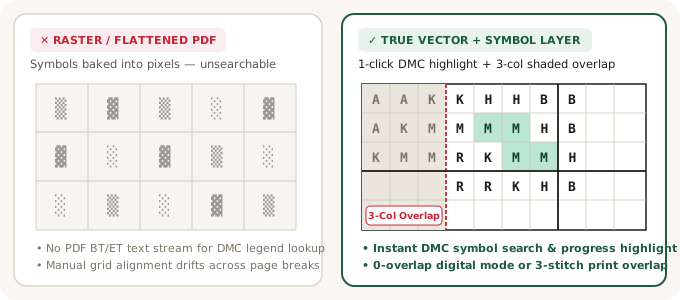
Whether you stitch exclusively on a Samsung Galaxy Tab S9, run Android apps on Windows Subsystem or ChromeOS, or sell downloadable Etsy embroidery packs that must satisfy both paper binder stitchers and digital tablet trackers, inspect how our vector output compares against flattened exports:
| Export Architecture | Vector 10×10 Grid | 1-Tap DMC Highlight | Overlap Handling | Best Workflow |
|---|---|---|---|---|
| CrossStitchGrid Vector PDF (0-Overlap) | Yes — Exact PDF 1.4 paths | Yes — WinAnsi Courier text | Seamless 50×60 tile stitch | Pure Pattern Keeper & Markup R-XP digital tracking |
| CrossStitchGrid Hybrid PDF (3-St Overlap) | Yes — Shaded gray band | Yes — Distinct gray overlap | 3-col/row visual alignment | Etsy shop packs serving both paper printers & tablet users |
| Flattened PNG / Raster PDF Tools | No — Baked pixel bitmap | No — Requires manual OCR | Hard page cuts drift easily | Quick single-page mini motifs under 50 × 50 stitches |
| Scanned Paper Leaflets | No — Skewed camera lines | Partial optical guesswork | Manual crop per page | Archiving vintage out-of-print heirloom pamphlets |
Follow these four quick settings to ensure flawless grid alignment, zero double-counted border stitches, and automatic skein thread assignments on your first import:
If you only stitch digitally on an Android tablet, leave Multi-Page Tile Overlap set to 0-Stitch Overlap. Every 50×60 page tile joins edge-to-edge automatically without needing to trim repeated rows.
Designing commercial charts for customers who print US Letter or A4 sheets? Select 3-Stitch Shaded Overlap so paper stitchers get shaded gray reference columns on pages 2+ while tablet users spot overlap bounds instantly.
Converting a family wedding portrait or dog photo? Dial in skin-tone locks and 2-strand tweeding inside our photo to cross stitch converter or right here in the sidebar before exporting your vector PDF.
Every PDF includes Page 2+ DMC shopping tables, and you can cross-check Over-2 linen framing borders anytime in our cross stitch fabric calculator before cutting expensive Zweigart cloth.
Note on backstitching and blended threads: Pattern Keeper focuses primarily on full-cross symbol tracking and renders vector backstitch lines as visual reference overlays rather than countable stitches. When you enable 2-Strand Tweeding blends (such as 310+3799), our exporter assigns each blend its own distinct single-byte ASCII character in the PDF legend so you can still highlight and mark off blended full crosses with full progress percentages!
Convert family & pet portraits with SIGGRAPH DPID detail preservation and skin-tone locks.
STEP 02 · STUDIO WORKFLOW 🧵 Interactive 489 DMC Color Chart →Check off owned bobbins in your browser stash and find Anchor floss equivalents.
STEP 03 · STUDIO WORKFLOW 📐 Fabric & Skein Yardage Calculator →Size 14ct, 16ct, 18ct Aida and 28ct/32ct evenweave linen cuts with framing margins.
No. CrossStitchGrid.com is an independent browser-based chart studio, and Pattern Keeper is a product of its respective creators. Our PDF exporter outputs open ISO-standard PDF 1.4 vector geometry and WinAnsi symbol text streams engineered to import cleanly into Android chart trackers, Markup R-XP, GoodNotes, and desktop PDF readers.
Custom embedded symbol fonts often use private Unicode codepoints or unmapped glyph indices (`Identity-H`), causing tablet parsers to misread two different thread colors as the same blank character. Using crisp standard Type1 `Courier-Bold` printable ASCII characters guarantees 1:1 symbol-to-DMC matching without font subsetting bugs.
Choose 0-Stitch Overlap whenever your PDF is intended purely for digital tablet tracking so adjacent 50×60 tiles merge automatically with zero duplicate edge columns. Choose 3-Stitch Shaded Overlap if you also plan to print physical US Letter or A4 pages for a travel binder.
Never. Every step—CIEDE2000 color quantization, Potts MRF confetti removal, and binary PDF 1.4 byte compilation—executes 100% locally inside your browser tab. Independent Etsy and Shopify designers can safely convert proprietary artwork offline without cloud storage leaks.
Each optical 1+1 strand blend (for example, `Blend 742 + 744`) receives its own dedicated ASCII symbol and stitch tally row on the DMC Legend page, while parent skein yardage is split 50/50 so your shopping list never over-orders cotton skeins.
Yes! Because our files contain genuine PDF vector gridlines, standard 10×10 bold block rules, and structured `Symbol / Number / Color Name / Stitches` legend headers, iPad iOS stitchers using Markup R-XP or Apple Books enjoy razor-sharp infinite zoom and symbol recognition.